
Last updated on April 10th, 2026 at 11:33 am
To help you navigate the crowded market, we’ve rounded up the 5 best AI presentation makers available right now.

This post may contain affiliate links. We may earn a commission if you purchase an item through our links. It costs you nothing and helps us to fund this blog. Please see our Affiliate Disclosure & Notification for details.
5 Best AI Presentation Makers to Supercharge Your Client Pitches in 2026
We’ve all been there: staring blankly at a white slide, spending hours hunting for the right stock photos, and endlessly tweaking text boxes until they align perfectly for a client presentation. Historically, creating a compelling business deck has been a grueling, time-consuming process.
Once you’ve used strategies like localized SEO and drive leads, you need a high-converting pitch deck to actually close the deal. But in 2026, you don’t have to build those decks from scratch anymore.
AI presentation makers have evolved rapidly. They no longer just spit out generic, disorganized text; the best tools on the market now handle deep research, content structuring, and professional design in a matter of seconds. Whether you’re a local business owner pitching a new client, an agency presenting an SEO strategy, or a founder looking to secure funding, AI can cut your design time by more than half.
To help you navigate the crowded market, we’ve rounded up the 5 best AI presentation makers available right now.
1. GenPPT
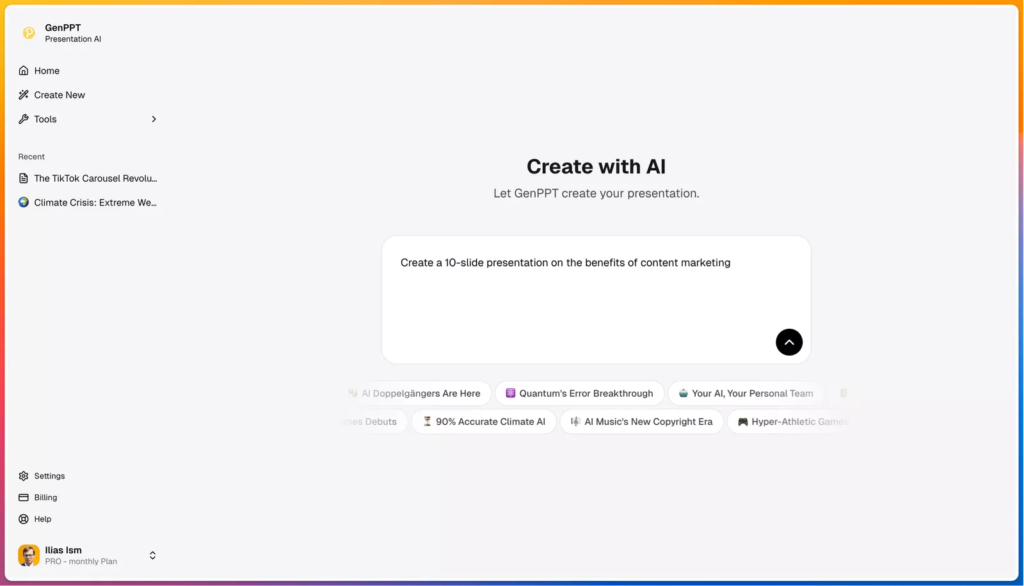
Best Overall for Research, Structure, and Native PowerPoint Export
If you are looking for the “ChatGPT for Presentations,” GenPPT takes the top spot. While many AI tools slap generic filler text onto pretty backgrounds, GenPPT focuses heavily on substance and intelligent formatting for B2B use cases.
It is designed to turn your rough notes, links, or a simple topic prompt into a highly polished, well-structured slide deck in minutes. For a web design agency or an IT consultant, you can drop your rough project notes into GenPPT, and it will instantly structure a professional client proposal.
What makes GenPPT stand out is its “Smart Slide Structure”—it doesn’t just dump text onto a page; it intelligently organizes your content with clear titles, logical bullet points, and a flow built specifically for presenting. Furthermore, unlike platforms that trap your work behind a paywall, GenPPT prides itself on its native PowerPoint export. You get a true .pptx file that you can download and edit anywhere.
Key Features:
- From Notes to Slides: Paste up to 1,000 pages of notes, and the AI will condense it into 10 high-impact slides.
- True Native Export: Download completely editable PowerPoint (.pptx) files to use in your existing workflows.
- Smart Structuring: Automatically formats compelling narratives for pitch decks, marketing campaigns, and business proposals.
- AI Chat Assistant: Easily tweak content, expand on bullet points, and edit individual slides using simple text prompts before downloading.
The Verdict:
GenPPT is the absolute best choice for founders, consultants, and agencies who need substantive, well-researched content fast. As one marketing consultant noted, “I used to spend hours on presentations. Now I spend minutes. My clients can’t tell the difference.”
2. Gamma
Best for Highly Visual, Web-Style Presentations
If your priority is modern, striking aesthetics and you want a presentation that feels more like a scrolling website than a traditional slide deck, Gamma is a fantastic choice.
Gamma requires almost zero setup. You type in a prompt, the AI generates a brief outline, and within a minute, you have a beautiful, scrollable presentation. It is incredibly popular among startups and creative agencies who want to break away from the classic 16:9 PowerPoint look and impress modern tech clients.
Key Features:
- Web-Style Layouts: Creates fluid, scrollable cards instead of rigid slides.
- Easy Theme Switching: Change the entire aesthetic of your presentation with one click.
- Embedded Media: Easily drop in GIFs, videos, and interactive charts.
The Verdict:
Choose Gamma if you want a visually stunning, modern deck to showcase creative portfolios or modern tech solutions, and don’t mind sacrificing traditional formatting.
3. Plus AI
Best for Google Workspace Users
For remote teams whose entire workflow is already deeply integrated into Google Workspace, learning a brand-new presentation platform can be a hassle. Plus AI solves this by living directly inside Google Slides as an extension.
You simply open your extensions panel, type in your prompt, and Plus AI will generate the slides right in front of you. It also allows you to remix existing slides, rewrite content, and adjust layouts without ever leaving your familiar Google environment.
Key Features:
- Native Integration: Works directly inside Google Slides and Microsoft PowerPoint.
- Slide Remixing: Use AI to reformat or improve your existing, manually-created project roadmaps or monthly reports.
- Custom Branding: Save your agency’s themes and let the AI generate content that matches your brand guidelines.
The Verdict:
Plus AI is ideal for corporate teams and B2B agencies who want AI assistance but refuse to leave the Google Slides ecosystem.
4. Canva Magic Design
Best for Ultimate Design Freedom & Brand Matching
Canva is already a titan in the graphic design space, and their AI presentation features (Magic Design) bring that massive library of assets into the AI age.
When you build a custom website for a client, their pitch decks should seamlessly match that same web design branding. Because it exists inside the Canva ecosystem, you have unparalleled control over the final product. You can drag and drop thousands of stock photos, graphic elements, videos, and fonts to perfectly align the AI’s first draft with your client’s visual identity.
Key Features:
- Massive Asset Library: Access millions of premium stock photos, icons, and graphics.
- Follow-up Prompting: The AI asks clarifying questions to ensure the generated outline matches your vision.
- Multi-Format Export: Export to PowerPoint, PDF, or even MP4 video.
The Verdict:
Perfect for marketers, web designers, and social media managers who want an AI head-start but demand granular, pixel-perfect control over the final brand design.
5. Beautiful.ai
Best for Strict Brand Consistency
Beautiful.ai is exactly what it sounds like—an AI tool dedicated to making sure your slides always look professionally aligned. If you’ve ever ruined a client proposal by making a text box too large or dragging an image out of alignment, Beautiful.ai prevents that.
Its “smart templates” adapt automatically as you add or remove content. If you add a new bullet point detailing a service package, the AI auto-resizes the text and adjusts the layout to maintain perfect spacing and design principles.
Key Features:
- Auto-Adapting Layouts: Slides automatically reorganize themselves when you add new text or images.
- Brand Controls: Lock in corporate fonts, colors, and logos so your team can never create an “off-brand” presentation.
- Smart Charts: Easily input data and let the AI generate beautiful, animated infographics for SEO reports or financial summaries.
The Verdict:
The go-to tool for enterprise teams and agencies that need to produce hundreds of client-facing presentations while strictly maintaining corporate brand guidelines.
Final Thoughts: Which Tool Should You Choose?
The AI presentation landscape has matured incredibly in 2026. Your choice ultimately depends on your specific business workflow:
- If you need visually flashy, non-traditional web decks for a creative pitch, go with Gamma.
- If you want total design control to perfectly match a client’s branding, opt for Canva.
- But if you want the best B2B all-rounder that handles deep topic research, structures your narrative logically for proposals, and gives you a true, native PowerPoint file to edit on your own terms, GenPPT is the undisputed winner.
Ready to stop staring at blank slides? Try out one of these AI tools today and win back hours of billable time.

I'm a freelance writer from Israel. I like to write about just about anything. English is my 2nd language so please forgive me if my writing isn't perfect.
Subscribe to Our Mailing List
If you found the information in this post helpful, we'd love to have you join our mailing list. We promise we won't spam you, we only send out emails once a month or less.